Run your own live media operations
Self-hosted control plane for multistreaming, 24/7 channels, and distributed media nodes.
$ curl -fsSL https://install.fluxomni.io | bash Stream to
Capabilities
Three modes, one platform
Multistream, linear channel, or distributed fleet — every capability runs on the same control plane you own and operate.
Mode
Multistream
Broadcast one encoder to many platforms.
Multi-destination
Fan out one encoder to YouTube, Twitch, Facebook, and custom RTMP / SRT / Icecast outputs simultaneously.
Protocol support
RTMP push/pull, SRT, and WebRTC ingest. RTMP/RTMPS, SRT, and Icecast output. HLS live preview.
Copy-through fan-out
Ingest once, fan out to every configured destination without re-encoding — copy-through pipelines keep CPU low even at dozens of routes.
Mode
Linear channel
Run scheduled channels without an encoder.
Playlist playback
Queue pre-recorded files from local storage or Google Drive and stream them 24/7 without an external encoder.
File backup
Dedicated file-backup loops run underneath the playlist as an automatic safety net if a source fails.
Audio mixing
Mix in additional audio tracks alongside the primary program — per-output mixes, level control, and fades.
Mode
Distributed fleet
Scale media processing and survive failures.
Fleet management
Scale by adding media nodes across regions. Monitor health, assignments, and resources from a single control plane.
Automatic ingress failover
Event-driven failover across primary, backup, file-backup, and playlist sources keeps the channel live.
Secure by default
Named local-user auth with RBAC, browser sessions, API basic-auth, and internal token-based node trust.
Linear channel mode
Channels that broadcast themselves
Upload files, define a playlist, and FluxOmni streams 24/7 to every destination you configure — no OBS, no encoder, no hands. File backup kicks in if anything goes sideways.
Scheduled programming
Queue pre-recorded files with file-level advancement and failure handling.
Google Drive backed
Files sync from local storage or Google Drive — no manual uploads to the server.
Failover-aware
Playlist takes precedence; file-backup loops underneath as a safety net.
Use cases
Built for the operators who ship streams
Three named scenarios with full setup walkthroughs in the docs — pick the one closest to your team.
Agencies
Run 20+ client streams from one control plane
Multistreaming ops for agencies managing dozens of client routes across YouTube, Twitch, and custom CDNs. Batch output controls, export/import, per-client labels.
Read scenarioBroadcast ops
Distributed 24/7 broadcasting with regional failover
Multi-region media nodes, automatic ingress failover, linear playlist channels for 24/7 programming, and a unified operator surface with DVR recording.
Read scenarioPower creators
Scale past SaaS caps without leaving your laptop
Stream to unlimited destinations with copy-through fan-out, audio mixing, and HLS preview. No per-stream fees. Your RTMP server, your data.
Read scenarioChangelog
What's new
Recent highlights from the latest releases.
Stable Push Token Rotation
Rotate publish credentials without recreating the route. Older routes are backfilled automatically.
Simplified Fleet Onboarding
Streamlined Add Node flow with clean node removal, full proxy URL support, and media nodes that unregister cleanly on shutdown.
Immutable Main Build Tags
Pin a known main-<shortsha> image without rebuilding. Successful main builds publish immutable tags alongside edge.
Smarter Cold-Start Probes
ffprobe timeouts no longer leak false errors to the operator UI.
Multi-User Authentication
Named user accounts with per-user passwords, role-based access control (admin and operator), configurable session expiry, and self-service password management.
Attention Feed
Dedicated alert surface that aggregates route-health and fleet-node issues, with drill-down and dismiss.
Redesigned Operator UI
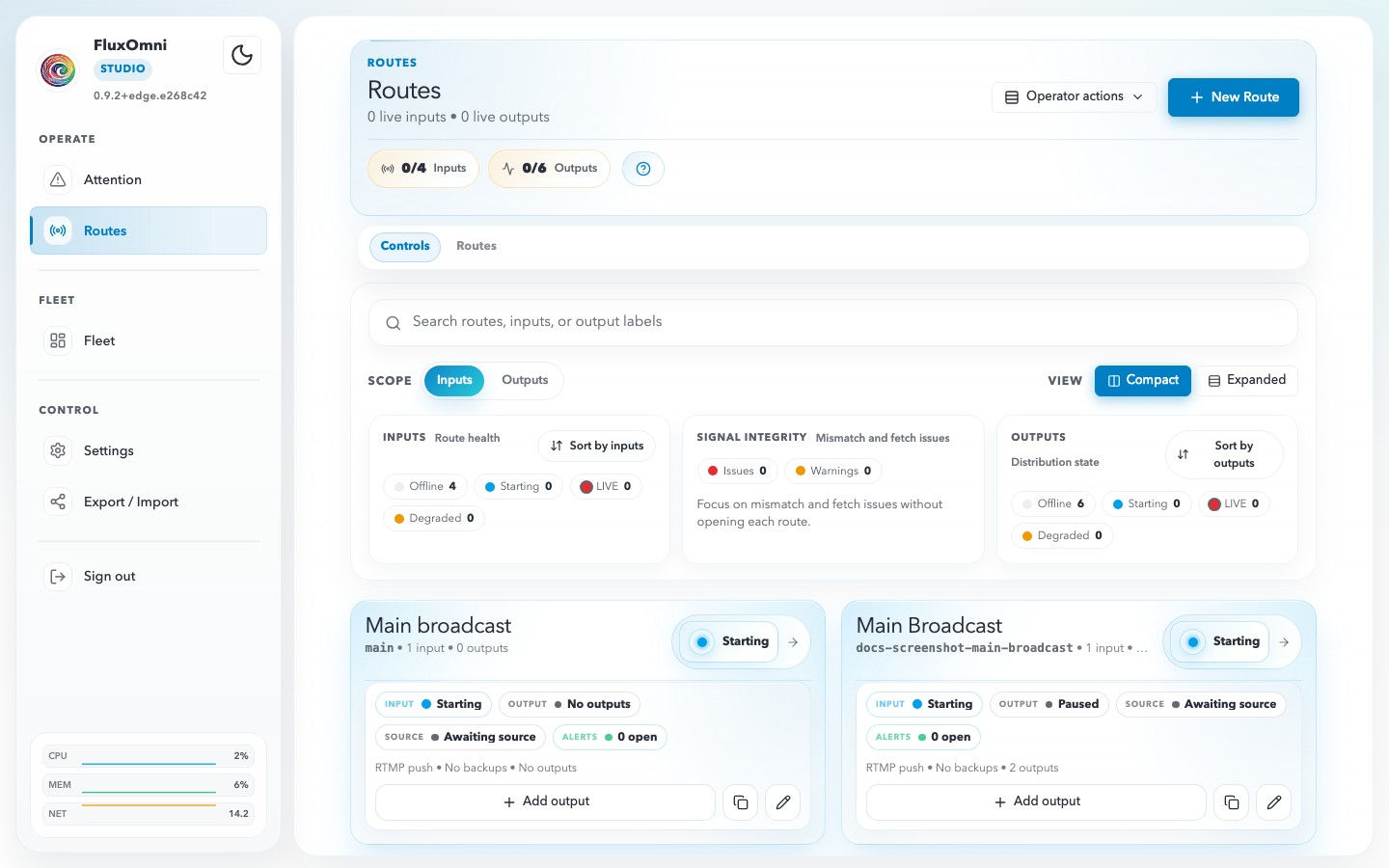
Compact route cards with structured signal tiles, inline search, density controls, and a unified header across Operate / Fleet / Control.
Low-Latency HLS Preview
Near-real-time in-browser preview with 1-second HLS segments, tighter live-edge sync, and TLS-friendly control-plane relay.
Operator UI
Manage everything from your browser
Real-time route management, fleet monitoring, alert triage, and browser-based control — all from a responsive web interface.
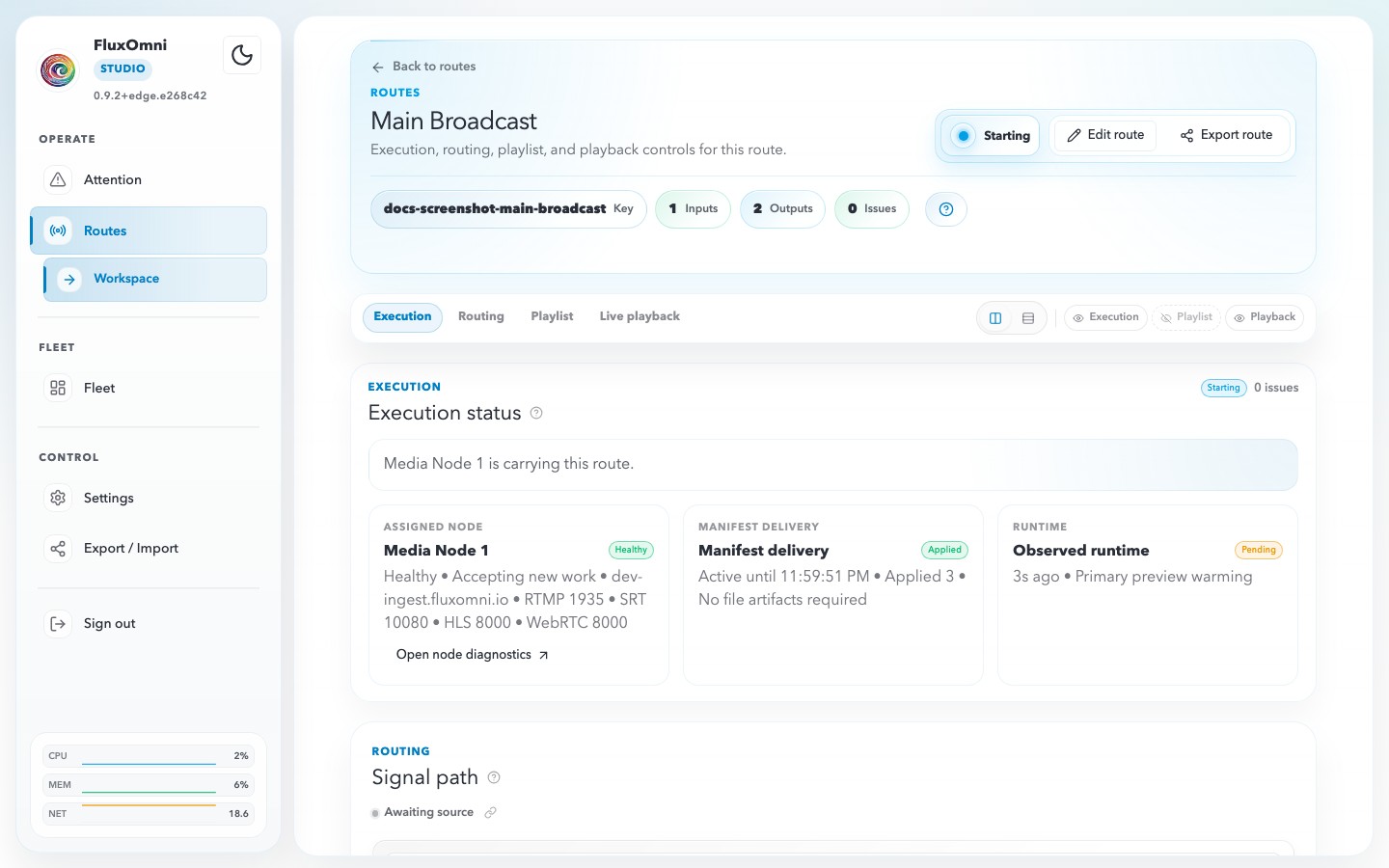
Route Workspace
Execution status, routing tools, playlists, and live playback
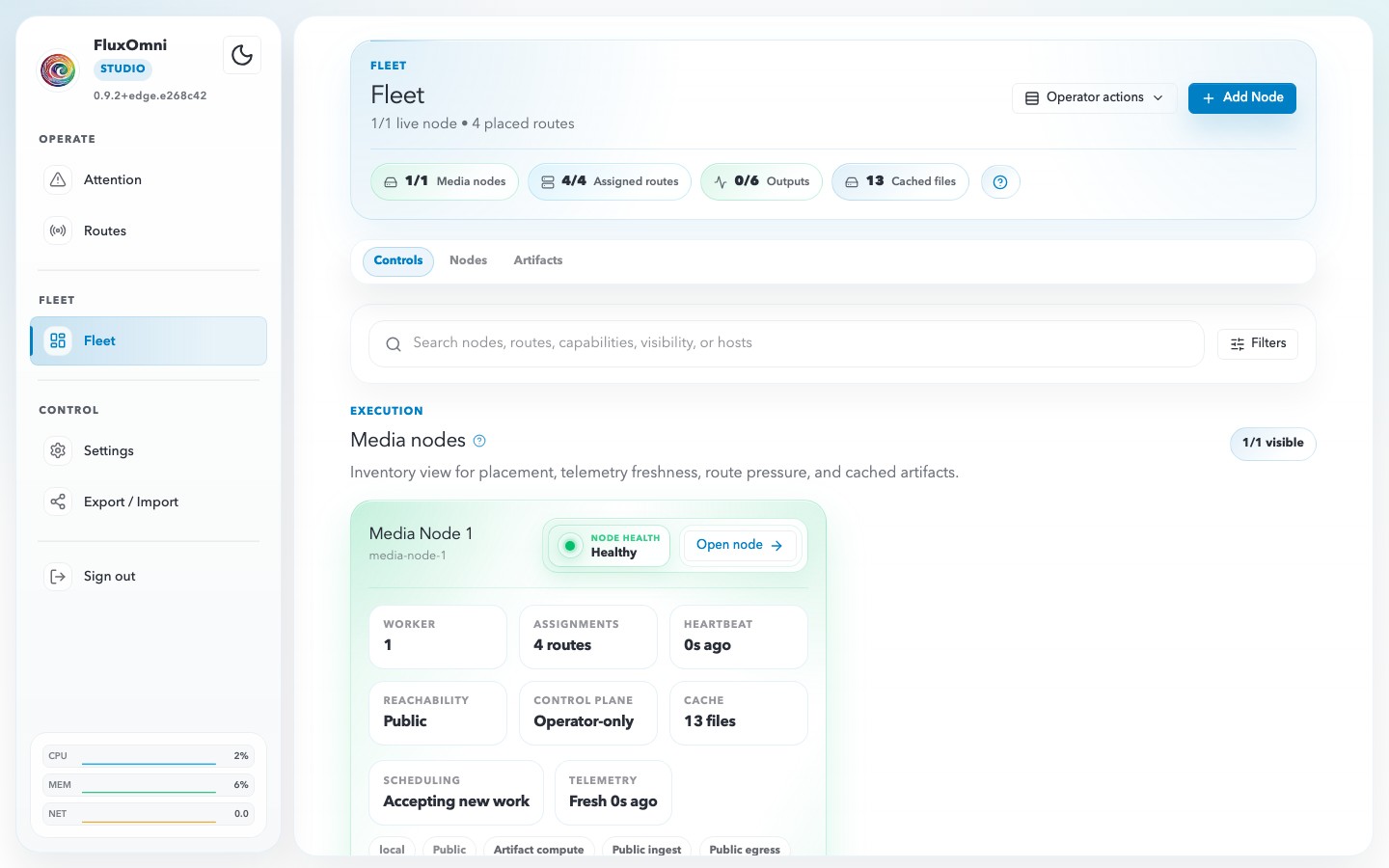
Fleet Monitoring
Node health, route assignments, cached artifacts, and server metrics
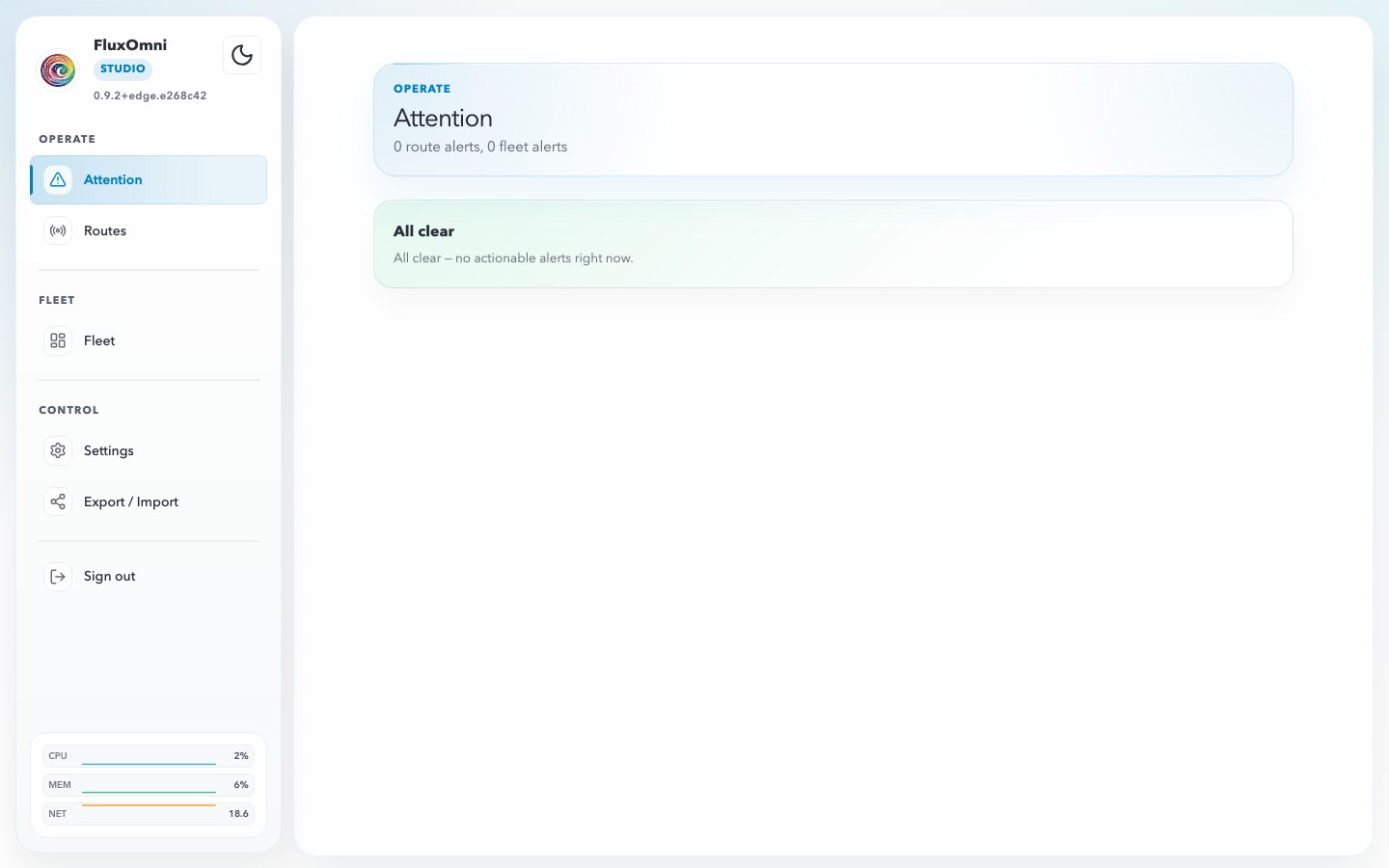
Attention Feed
Route and fleet alert triage, acknowledgements, and all-clear state
Architecture
How FluxOmni works
A split architecture that separates control from execution — scale each independently.
Control Plane
- Operator UI & GraphQL API
- Route & output management
- Manifest planning & failover
- Fleet orchestration
Media Node
- SRS ingest (RTMP, SRT, WebRTC)
- FFmpeg pipelines (copy, transcode, mix)
- HLS preview & DVR recording
- Playlist & file-backup playback
One control plane, unlimited media nodes. Add nodes across regions to scale your streaming capacity.
Platform vision
From multistreamer to media operations platform
FluxOmni is built as a distributed media operations framework. Today it ships live multistreaming, linear channels, and distributed fleets. The platform grows into asset management, render jobs, event-driven automation, and AI-powered workflows — all on the same control plane, all on your infrastructure.
Shipping now
Shipping- Live multistreaming (RTMP / SRT / WebRTC ingest)
- Linear channel playback with playlists + Google Drive
- Distributed fleet with automatic failover
- DVR recording + HLS preview
Coming
Coming- Asset ingest + media catalog
- Distributed render jobs
- Event-driven automation workflows
On the roadmap
Roadmap- AI-powered clip assembly ("OpusClip-like" automated highlights)
- Expanded integrations (Slack, webhook pipelines, object storage)
Shape what comes next
Design Partners get early access to Coming features, direct roadmap influence, and locked-in pricing.
Apply for Platform Early AccessHow we compare
One stack replaces two categories
Today's operators juggle a SaaS multistreamer and a separate enterprise media platform. FluxOmni covers both on your own infrastructure.
vs SaaS multistreamers
Restream, Castr, StreamYard
| FluxOmni | Restream / Castr | |
|---|---|---|
| Self-hosted | ✓ Yes | ✕ SaaS only |
| Per-stream fees | ✕ None | ✓ Tiered $20–$300+/mo |
| Unlimited outputs | ✓ Yes | ~ Tier-capped |
| Data sovereignty | ✓ Yours | ✕ Vendor-hosted |
| Setup | Docker on any *nix | Sign up |
vs enterprise media platforms
AWS MediaLive, Wowza, AntMedia
| FluxOmni | AWS MediaLive / Wowza | |
|---|---|---|
| Operator UI | ✓ Modern, browser | ~ Partial / separate tools |
| Distributed fleet | ✓ Built-in | ✓ Available |
| Pricing model | Fixed infra + license | Per-minute / per-channel |
| Self-hosted | ✓ Yes | ~ Wowza: yes, MediaLive: no |
| Learning curve | Docker + install | Multi-day |
Requires Docker on *nix (x64/ARM64). No Windows host support. You run the server.
No telemetry
FluxOmni never phones home. No analytics, no tracking.
Your data, your servers
Runs entirely on your *nix infrastructure. No SaaS dependency.
Open protocols
Standard RTMP / SRT / WebRTC / HLS. No vendor lock-in.
Auditable deployments
Pinned Docker tags, published release notes, reproducible installs.
Get Started
Running in minutes
One command installs FluxOmni on any *nix server (x64 or ARM64). Windows is not supported.
Install
The installer bootstraps Docker if needed, pulls images, and starts the stack.
$ curl -fsSL https://install.fluxomni.io | bash Open the Control Surface
Access the operator UI at your server's IP address.
Stream
Create a route, add your platform outputs, point your encoder at the generated publish address, and go live.
Pin a version
FLUXOMNI_VERSION=v0.10.1 \
 curl -fsSL https://install.fluxomni.io | bash
Edge channel
FLUXOMNI_VERSION=edge \
 curl -fsSL https://install.fluxomni.io | bash
Add a media node
curl -fsSL https://install.fluxomni.io \
 | bash -s -- media-node
Pricing
Free to self-host. Commercial when it counts.
Three tiers: free for personal use, commercial license for organizations, and Platform Early Access for teams shaping what comes next.
Free self-host
PolyForm Non-Commercial
$0
For: Hobbyists, personal projects, evaluation
- Full multi-destination streaming
- Linear channel playback
- Single-host and distributed fleet
- Published Docker images on GHCR
- Community support via GitHub Issues
PolyForm Non-Commercial 1.0.0. Not for commercial use.
Business
RecommendedCommercial License
Contact us
For: Agencies, broadcasters, studios, organizations
- Everything in Free
- Commercial-use license terms
- Priority email support
- Security advisories in advance
- Optional deployment review
Platform Early Access
Coming features, shaped with you
Design partner terms
For: Teams that want asset ingest, render jobs, automation, and AI clip assembly as they land
- Everything in Business
- Early access to Phase 4 features (render jobs, asset catalog, automation, AI clip assembly)
- Direct roadmap influence
- Design-partner pricing locked for early cohort
FAQ
Answers for prospects and operators
Licensing, comparison, protocols, support. If you don't find what you need, send us a note.
Can I use FluxOmni commercially?
Not under the default PolyForm Non-Commercial license — that covers hobbyists and personal use. For commercial use (agencies, broadcasters, any revenue-adjacent deployment), you need a Business license. Contact sales.
How does this compare to Restream / Castr?
FluxOmni is self-hosted. You run it on your server, pay no per-stream fees, and stream to unlimited outputs. Restream and Castr are SaaS with tiered pricing and stream caps. See the comparison.
How does this compare to AWS MediaLive or Wowza?
Similar category — distributed media infrastructure — but priced as a fixed infra + license cost instead of per-minute billing, and built around a modern operator UI rather than console + APIs.
Do you offer managed hosting?
Not yet. The Platform Early Access program includes optional deployment review and direct founder support during rollout.
Is there a SaaS / managed-cloud version?
Not yet. Follow the Platform Early Access program if managed becomes relevant for your team.
What protocols do you support?
Ingest: RTMP push/pull, SRT push, WebRTC push. Outputs: RTMP/RTMPS, SRT, Icecast, and file output for local recording. Preview: HLS.
Can FluxOmni stream without an external encoder like OBS?
Yes — linear channel mode plays back a scheduled playlist of files (local or Google Drive) directly to every configured destination. File backup kicks in if anything fails.
Does it run on Windows?
No. FluxOmni runs on *nix (x64 or ARM64) via Docker.
What kind of support do I get?
Free tier: community support via GitHub. Business: priority email + advance security advisories. Platform Early Access: direct roadmap access.
What's on the roadmap?
Shipping now: live multistreaming, linear channels, distributed fleet. Coming: asset ingest and catalog, distributed render jobs. On the roadmap: event-driven automation, AI-powered clip assembly.